
Modernizing WordPress Deployment with CI/CD, Docker, and Composer
Introduction
This case study explores how we modernised a WordPress deployment pipeline using Composer, Docker, and Bitbucket Pipelines, deployed on DigitalOcean with monitoring via Site24x7. We introduced environment separation with Non-Production and Production setups, enabling controlled testing, automated deployments, and safer release workflows, all while keeping costs lean using DigitalOcean’s Droplets and Managed MySQL.
Client Details
We supported a Europe-based software development company in successfully modernising their WordPress environments. Our engagement focused on building a robust, automated deployment pipeline and implementing infrastructure best practices, enabling their team to ship updates confidently and securely.
Pain Point / Problem Scenario
The legacy setup involved a single WordPress instance running on a VPS with manual updates and plugin management. Several challenges emerged:
- No separation between staging and production: any mistake affected live users
- Manual plugin updates and WordPress core changes led to downtime
- No rollback mechanism or deployment visibility
- Lack of automated testing or code quality control
- Minimal monitoring—most issues were caught post-incident
- High developer onboarding time due to inconsistent environments
Solution
Overview
| Tool/Platform | Purpose |
|---|---|
| Docker | Containerized WordPress environment |
| Composer | Dependency management for WP core/plugins |
| Bitbucket Pipelines | CI/CD automation |
| SonarQube | Code quality checks for custom plugins |
| Site24x7 | Endpoint and server monitoring |
| DigitalOcean | Hosting with Droplets + Managed MySQL |
Environment Structure
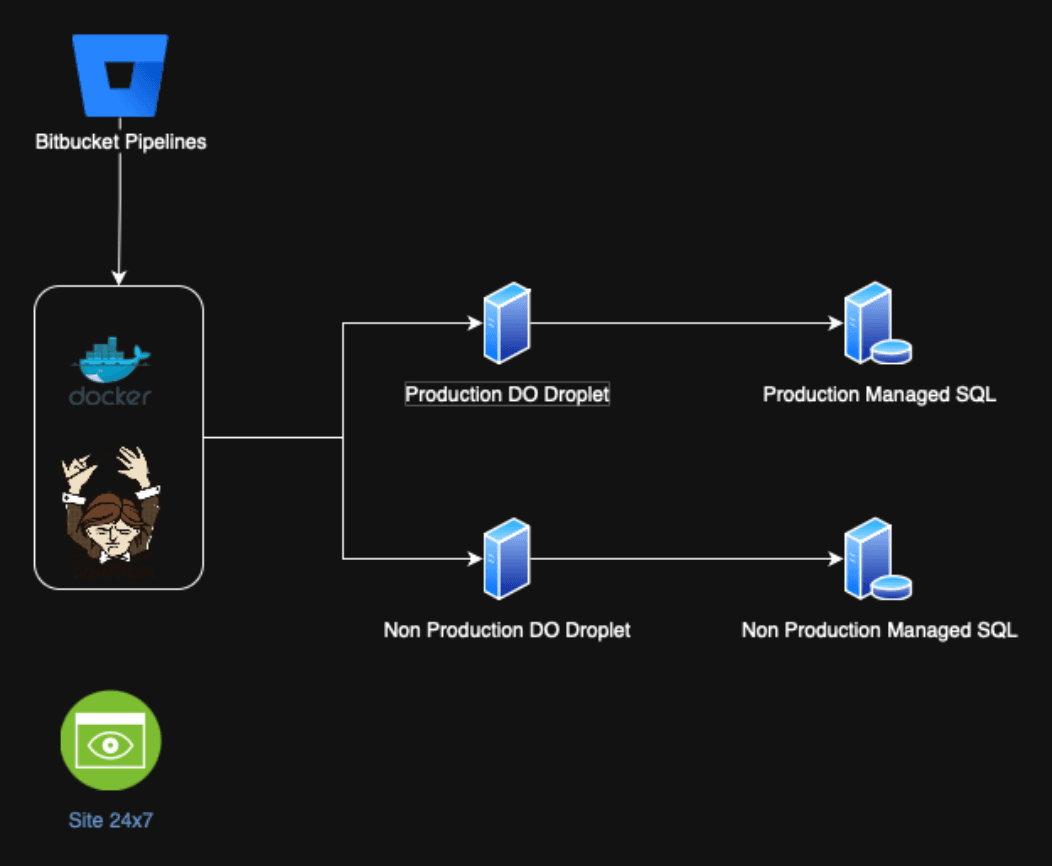
We introduced two isolated environments:
Non-Production Environment
- URL: https://uat.domain.com
- Hosted on a separate Droplet
- Connected to a staging MySQL DB
- Auto-deployed from the
developbranch - Used for internal QA, content testing, and stakeholder review
- Exposed to SonarQube scans via Bitbucket Pipelines
- Monitored via Site24x7 (uptime, performance, functional health endpoints)
Production Environment
- URL: https://www.domain.com
- Hosted on a separate Droplet with more resources
- Connected to a Managed MySQL production DB
- Deployed from the
mainbranch after approvals and UAT - Secure environment: no direct changes, everything goes through CI/CD
- Production-grade monitoring, backups, and health checks via Site24x7
Architecture Diagram
Deployment & Workflow
Project Structure
/
├── docker-compose.yml
├── .bitbucket-pipelines.yml
├── composer.json
├── composer.lock
├── web/
│   ├── wp/                # WordPress core (via Composer)
│   └── wp-content/
│       ├── plugins/       # Custom plugins
│       └── themes/        # Custom themes
└── custom-plugins/
Bitbucket Pipelines Configuration
pipelines:
  branches:
    develop:
      - step:
          name: Deploy to Non-Prod
          script:
            - composer install --no-dev
            - docker-compose -f docker-compose-uat.yml up -d --build
            - echo "Deployed to UAT"
    main:
      - step:
          name: Deploy to Production
          trigger: manual
          script:
            - composer install --no-dev
            - docker-compose -f docker-compose-prod.yml up -d --build
            - echo "Deployed to Production"
- Deployments to UAT are automated on push to
develop. - Production deployments are manual (triggered only after UAT approval).
Code Quality
- Custom plugins in
wp-content/plugins/were scanned using SonarQube CLI. - Integrated into Bitbucket Pipelines before every deployment.
- Static analysis helped detect vulnerabilities and bad coding practices.
Monitoring with Site24x7
| Layer | Monitoring | Details |
|---|---|---|
| Endpoint | Health checks | /wp-json/health-check/v1/status |
| Infra-level | Server & Docker | CPU, Memory, Disk, Docker status |
| Alerting | Multi-channel | Email, Slack, and SMS notifications |
Site24x7 allowed proactive action before customers noticed issues.
Cost-Effective Hosting on DigitalOcean
| Component | Environment | Service | Cost Estimate |
|---|---|---|---|
| Web Server | Non-Prod | 2vCPU, 2GB Droplet | $12/month |
| Web Server | Production | 4vCPU, 8GB Droplet | $48/month |
| MySQL Database | Non-Prod | Managed MySQL (1GB) | $15/month |
| MySQL Database | Production | Managed MySQL (2GB+) | $30/month |
| Monitoring | Both | Site24x7 (Free/Basic) | Free – $9/month |
Total monthly cost: ~$100 for two environments, significantly less than comparable AWS or GCP setups with managed services and monitoring.
Benefits
| Area | Improvement |
|---|---|
| Deployment | CI/CD controlled, rollback-safe deployments |
| Staging/UAT | Safe testing environment before production |
| Dependency Mgmt | Composer enforces consistent plugin/core versions |
| Security | No direct access needed for deployments |
| Code Quality | SonarQube ensures cleaner custom plugin code |
| Monitoring | Full visibility and alerts through Site24x7 |
| Cost Efficiency | Scalable infra under $100/month with two environments |
Conclusion
By adopting a modern deployment workflow using Composer, Docker, Bitbucket Pipelines, and DigitalOcean, we transitioned WordPress from a legacy monolith to a maintainable, automated, and secure application. With clear environment separation and monitoring, we achieved faster deployments, better testing discipline, and high confidence in production changes—all while remaining budget-conscious.
Interested in similar results?
Let’s discuss how Nerdience can transform your digital infrastructure with modern solutions.
Contact Us →